- Buy the instrument Checkout is handled by Polar, our store partner. Within a minute or two you'll get an email from them with an “Access your purchase” link. Can't find it? Check spam for a mail from Polar.
-
Copy your license key
Your key is shown immediately after checkout, with a Copy button — grab it there and you're done. If you closed that page, open the “Access your purchase” link in your email instead: Polar sends a short sign-in code, you enter it, and the key is there. It isn't printed in the email itself, so nobody can read it out of your inbox at a glance.
That page also has a Rotate button, which issues a brand-new key and retires the old one. Only use it if you think your key has been exposed — after rotating you'll need to activate again with the new key. - Download the instrument The download lives here, not in the email: get it from the instrument's card on our instruments page. It is the same installer as the free demo. If the demo is already installed, there is nothing new to download.
- Install and open the plugin Run the installer (the same one as the demo; a key simply ends the silences). Open the instrument in your DAW or as a standalone app.
-
Find the License dialog
Fastest route in every instrument: tap the
DEMOpill (the little badge in the top bar). Or go through settings:Instrument Where Gravity SETTINGS → License… Squares, Violince, Intellectualist tap the logo → License tab Glyph, Pendulum tap the title wordmark → License tab Fingerbang, Launchpad LICbutton in the top barHarleyQuinn-Pitcher SET gear → License tab 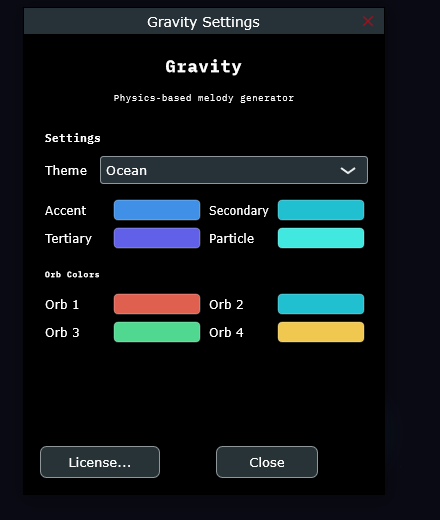
Gravity's settings — License… lives at the bottom. -
Paste your key and activate
Paste the license key you copied in step 2 and hit Activate. The plugin needs internet for this one moment; after that it runs happily offline for weeks at a stretch. The
DEMOpill disappears and the instrument is yours.
Good to know
Every instrument runs as a free demo until it is licensed: the whole instrument, every feature, but the output goes quiet at intervals. No email, no clock, no expiry. A key ends the silences.
A license covers 3 machines. Moving to a new computer? Open the License dialog on the old one and choose Deactivate this machine to free the slot.
Lost your key?
Search your mail for Polar and open the “Access your purchase” link in your receipt. It asks for a one-time code, emails you that code, and then shows your key again — you can come back to it as often as you like. Still stuck? Write us and we'll dig it out.
Need help? Email support@touchmachines.com — a human answers, usually within a day.