VIOLINCE
A bowed string instrument for your fingers. There are no keys and no samples — there's a simulated string, and your touch is the bow. Where your finger sits picks the note; how fast it moves is how hard you bow; where it sits vertically moves the bow along the string, from bridge-scratch to fingerboard-whisper. It squeaks if you lean on it. That's a feature. Real violins are also like this.
Quick Start
- Load VIOLINCE (or go standalone — it opens maximised; F11 for fullscreen).
- Stay on Glaesel Violin Classic, the clean default.
- Touch the surface and sweep vertically. The column picks the note; your sweep is the bow. A still finger bows nothing — this instrument demands motion.
- While bowing, slide up and down the strip. Near the bottom it turns bright and scratchy; near the top, breathy and soft. Watch the
PONT ─•─ TASTObar under the BOW pad track your finger. - Add a second finger on another column. Two strings. Add a third. Chords.
- Tap REC on Loop 1 (top strip), play a phrase, tap again. It loops — keep playing over it.
The Machine
- Top bar — Stop/Play and tempo (standalone; a host runs its own clock and the BPM display just agrees with it), preset browser with
<>steppers, the DEMO/license pill, MIDI Out toggle, and Hide — which collapses the right panel for a clean performance view. - Effects strip (top, full width) — five reverb knobs and the four gesture loops.
- Left panel — Instrument, Octave, Key Range, live readouts (bow position, bow speed, current note), and the logo at the bottom — tap it for Help, themes, and licensing.
- The surface — the instrument. Most of the window, as it should be.
- Scale strip (bottom) — the always-on key timeline with its TUNING chip.
- Right panel — two tabs: SOUND and VISUALS.
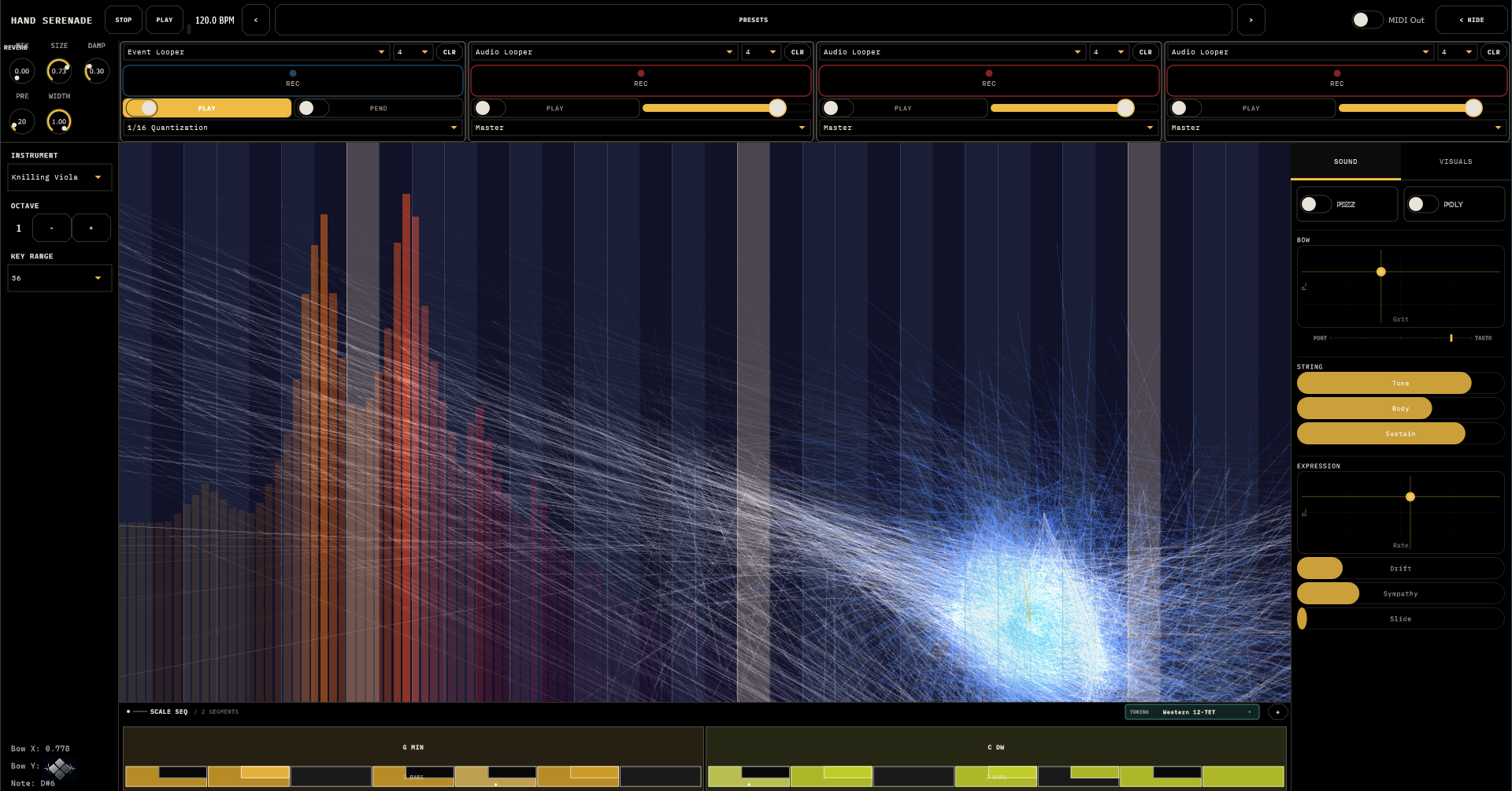
Every slider, knob, and pad resets to its default on a double-tap, and XY pads show a live numeric readout while your finger is down. Touch screens don't have hover — the interface answers questions where the finger already is.
The Surface
Think of it as a fretboard with the bow built in.
- Horizontal position = pitch. Columns are the notes of the current scale — root columns glow brightest, in-scale columns are lit, out-of-scale columns are nearly dark. Touch anywhere; you snap to scale. No wrong notes, only surprising ones.
- Vertical motion = bow speed. Fast sweep, loud and focused. Slow sweep, quiet and breathy. Reverse direction and the bow catches — a natural little attack, like a real change of stroke.
- Vertical position = where the bow sits on the string. Bottom of the strip is sul ponticello — near the bridge, glassy and fierce. Top is sul tasto — over the fingerboard, airy and soft. Hold a note and slide while bowing to travel between the two.
- Lift — the string rings down naturally into the reverb. Nothing stops dead.
Three fingers, three strings. Every finger is its own voice. With one finger down and POLY off, a crossover logic hands your line from string to string like a violinist's hand shifting on the fingerboard; POLY on gives every finger its own string, always — drones, dyads, counterpoint.
The Key Range selector (left panel: 6–60 semitones) sets how much pitch the surface spans. Narrow is precise and melodic; wide is glissando country.
Bow & Pizzicato
The SOUND tab. Two big pillars up top — PIZZ and POLY — because they change what the instrument is, not how it sounds.
The bow (BOW pad)
- Grit (X)
- How grabby the bow hair is. Low is polished and easy-singing; high is rosin, scratch, and attitude. The believable-violinist zone is roughly 0.2–0.5.
- Pressure (Y)
- How hard the bow leans on the string. Light is delicate; heavy is full-throated, and past that it skreeks. A real violin also skreeks. Push it on purpose sometimes.
Below the pad, the PONT ─•─ TASTO bar mirrors your finger's vertical position live — bright while bowing, dim at rest.
Pizzicato
Flip PIZZ and every touch becomes a pluck instead of a bow stroke. Level (how hard), Tone (warm → sharp), Decay (staccato snap → long pluck). The bass voicing in pizz mode is a standing invitation to write walking lines.
Vibrato (VIBRATO pad)
Rate (0.5–10 Hz) × Depth (0–100 cents). Real players sit near 5–6 Hz and 20–40 cents. Full depth is a half-semitone wobble — seasickness available on request.
String & Expression
- Tone (−1…+1)
- Darker or brighter than the voicing's natural voice.
- Body (0–1)
- How much of the instrument's wooden body you hear. At zero the string is naked and almost pure; at one it's fully resonant. Every voicing carries the body of a real measured instrument — violin, viola, cello, and double bass each sound like their own wood, because they are.
- Sustain (0–1)
- How long the string keeps singing after you stop driving it.
- Drift (0–1)
- Organic pitch instability. A touch (~0.2) is a human player; a lot is a player who's had a long night.
- Sympathy (0–1)
- The open strings (G·D·A·E) ring quietly along with what you play, a faint pitched halo behind sustained notes. Cellos love it around 0.5; keep fiddles drier.
- Slide (0–2000 ms)
- Off by default. Portamento between notes on the same string. Dial it in for gypsy swoops; leave it off for clean playing.
The six voicings
Glaesel Violin (clean, neutral) · Tseng Violin (darker, aged wood) · Knilling Viola (warm mid) · Hutchins Viola (warmest of the set) · Eastman Cello (deep, singing) · Eastman Bass (the floor). Each voicing re-tunes the surface's natural range and swaps in that instrument's real body resonance.
Scales, Keys & Other Worlds
The scale strip along the bottom owns the key — a chain of segments, each a root + scale + bar count, advancing with the transport. One segment is a static key; several are a progression. Tap a segment to edit (root, scale, bars, or sculpt a custom scale note-by-note); drag an edge to resize; + adds. 17 scales ship, Chromatic through both Diminisheds plus Arpeggio. The strip's mini-keyboards light up with what's actually playing — live fingers and loops both.
Other tuning worlds: the TUNING chip switches the global intonation — eleven systems, from Western 12-TET through Just Intonation, 24-tone Arabic maqam, 53-comma Turkish makam, 22-shruti, Persian dastgah, and Chinese 12-lü. A fretless bowed string is the natural home for these: the surface's columns snap to the system's true degrees and the strings glide between them exactly. MIDI out already speaks continuous pitch bend, so external synths follow for free.
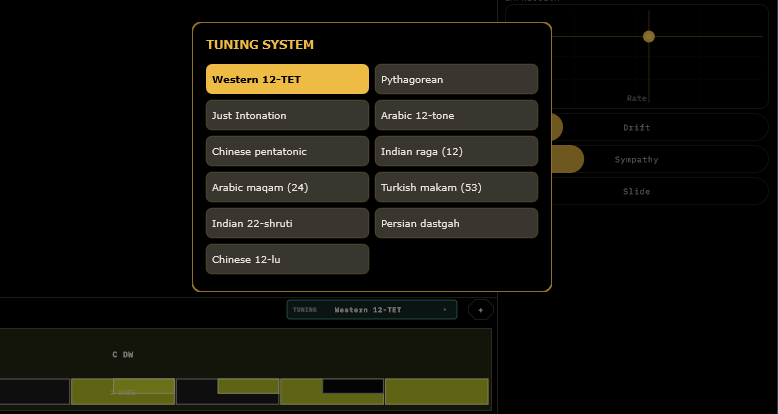
If a host pushes a global key (the TouchMachines Liveset does this), the strip goes read-only and shows FOLLOWING HOST until released. Your own progression is kept safe underneath.
Gesture Loops
Four loops in the top strip. The arithmetic: 3 live fingers + 4 loops × 3 strings = 15 strings at once. A one-person string section.
The crucial choice is the mode combo:
- Audio Looper
- Records sound. What you played is what repeats, frozen. Input Source picks what it hears: Master (everything), Live (your fingers only), or another loop — so loops can record loops, resampler-style.
- Event Looper
- Records the gesture: finger position, bow speed, timing. Playback re-performs it through the live engine — so change the scale, the instrument, the Body, anything, and the loop re-plays itself with the new settings. Record a bass line, switch the voicing to viola, and the same fingers now play viola. The phrase is choreography, not tape.
Per loop: Length (1–16 bars), REC (arms; recording starts on the next bar line and closes itself), PLAY, PEND (event loops ping-pong, lovely for slow material), CLR, volume (audio loops), and Quantize (event loops: off to 1/32 — snap a sloppy gesture to the grid).
Stop rewinds everything to bar one, loops included.
Reverb
Five knobs on the effects strip, master bus, after everything:
MIX (default 0.2) · SIZE (closet → cathedral) · PRE (0–200 ms gap before the room answers) · DAMP (bright tail → dark tail) · WIDTH (mono → full stereo). A soft limiter sits at the very end so enthusiastic triple-stops don't clip.
MIDI & Gesture Control
MIDI out (top-bar toggle): every string's notes on channel 1, velocity from bow speed, plus a live expression stream — CC 1 = bow speed, CC 11 = expression, and continuous pitch bend carrying slide, vibrato, and microtuning. Point it at a hardware synth and your bowing drives both instruments with one gesture.
Gesture input: VIOLINCE listens for CC gestures on channel 1, so a wiimote — or anything that sends CC — can bow it from across the room:
| CC | Gesture |
|---|---|
20 | Bow axis — wave to bow |
21 | Note axis — position on the fingerboard |
22 | Gate — bow on / off the string |
23 | Toggle arco / pizzicato |
The controller plays a virtual third finger alongside your real ones. Holding still lets the bow decay to silence, exactly like the touch surface.
Presets, Themes & Settings
Presets opens a browser with folders — tap to load, + SAVE, drag to reorganise, double-click to rename. The < > steppers thumb through everything without opening it. A preset captures all parameters, the scale timeline, the theme, and the loop recordings.
Fourteen factory presets: the six voicings in showcase form (Glaesel Violin Classic through Eastman Bass Pizzicato), six characters (Organic Violin, Singing Cello, Wild Fiddle, Dark Drone, Bright Soloist, Gentle Viola), and two gesture showcases — Bow Across (built for big vertical sweeps through the timbre range) and Ponticello Solo (bridge-side scratch; slide up the strip to soften it).
VISUALS tab — the spectrum display, the Spirals (a pitch-tracking visual that draws slow curls: opacity, trail, rotation, scale) and bloom. All cosmetic; all the first thing to turn down if the GPU complains.
The logo (bottom-left) opens Help and Settings: eight colour themes from Classic Amber to Golden Hour, custom accent colours, and licensing. VIOLINCE runs as a full-featured demo until it is licensed: every feature works, but the output politely goes quiet at intervals, enough to explore, not enough to record with. The top-bar pill takes you to activation; feed it a key and the silences stop.
Recipes
1 · Expressive solo
Glaesel Violin Classic. Pressure ~0.55, Grit ~0.35. Vibrato 5.5 Hz / 35 cents. A touch of Slide (~120 ms), Drift 0.15, Body 0.7. Long slow strokes, minor pentatonic, eyes closed.
2 · Drone bed
Eastman Cello Deep. Sustain high, Grit low. Two fingers on root and fifth, sweeping very slowly. Record 8 bars into an Event loop and improvise a third voice on top.
3 · The transforming bass line
Eastman Bass Pizzicato. Record an 8-bar walking line into an Event loop. Now switch the instrument to Knilling Viola — the same fingers play walking viola. The loop is choreography; the casting is up to you.
4 · Chord-progression pad
Slow two-finger viola bowing into a 4-bar Event loop. On the scale strip: C Maj · A Min · F Maj · G Maj, one bar each. The gesture stays; the harmony travels through it.
5 · Texture from instability
Grit 0.9, Drift 0.6, Body 1.0, Tone +0.3. Bow very slowly — the sound lives between noise and note. Reverb: Mix 0.6, Size 0.9, Damp low. Cinema.
6 · The full one-person string section
Loop 1 (Event, 4 bars, PEND): bass. Loop 2 (Event, 4 bars): two-finger pad. Loop 3 (Event, 3 bars): counter-line — the odd length drifts against the others. Loop 4 (Audio, 8 bars, source Master): freezes the whole room, reverb included, into a bed. Then play live over your own orchestra.
Field Notes
- Move slowly. This instrument rewards gesture, not taps. A steady slide with gentle vertical motion beats staccato jabbing every time.
- No sound? You're not moving. Bow speed comes from vertical motion — a parked finger is a silent bow.
- Too harsh? Less Pressure, less Grit, or bow higher on the strip toward tasto. You're leaning on the string; stop leaning.
- Small drift, small vibrato. Perfectly-in-tune is the one thing no string player has ever been.
- Pizz silent? PIZZ is off, or Level is at zero.
- Loop REC does nothing? The transport isn't running — recording waits for a bar line that never comes.
- Key controls locked? The strip is following a host key, or you're editing the wrong segment — the timeline owns the key.
- Stutters under load? Turn the Spirals and spectrum down on the VISUALS tab. The strings are cheap; the light show isn't.
- Use PEND for ambient. A 4-bar pendulum loop feels longer and less loopy than a forward 8.