Intellectualist
A drum machine with a DJ mixer welded on top, and a modulation system that slowly rearranges the furniture while you play. Five synthesized drum voices, a breakbeat slicer, a hex keyboard, two XY effect pads, a kick-pumped master crusher, a looper, and a button labelled FILL that commits tasteful crimes against your pattern once per bar. Built to be performed, not programmed.
Quick Start
- Load Intellectualist (standalone opens maximised; F11 for true fullscreen).
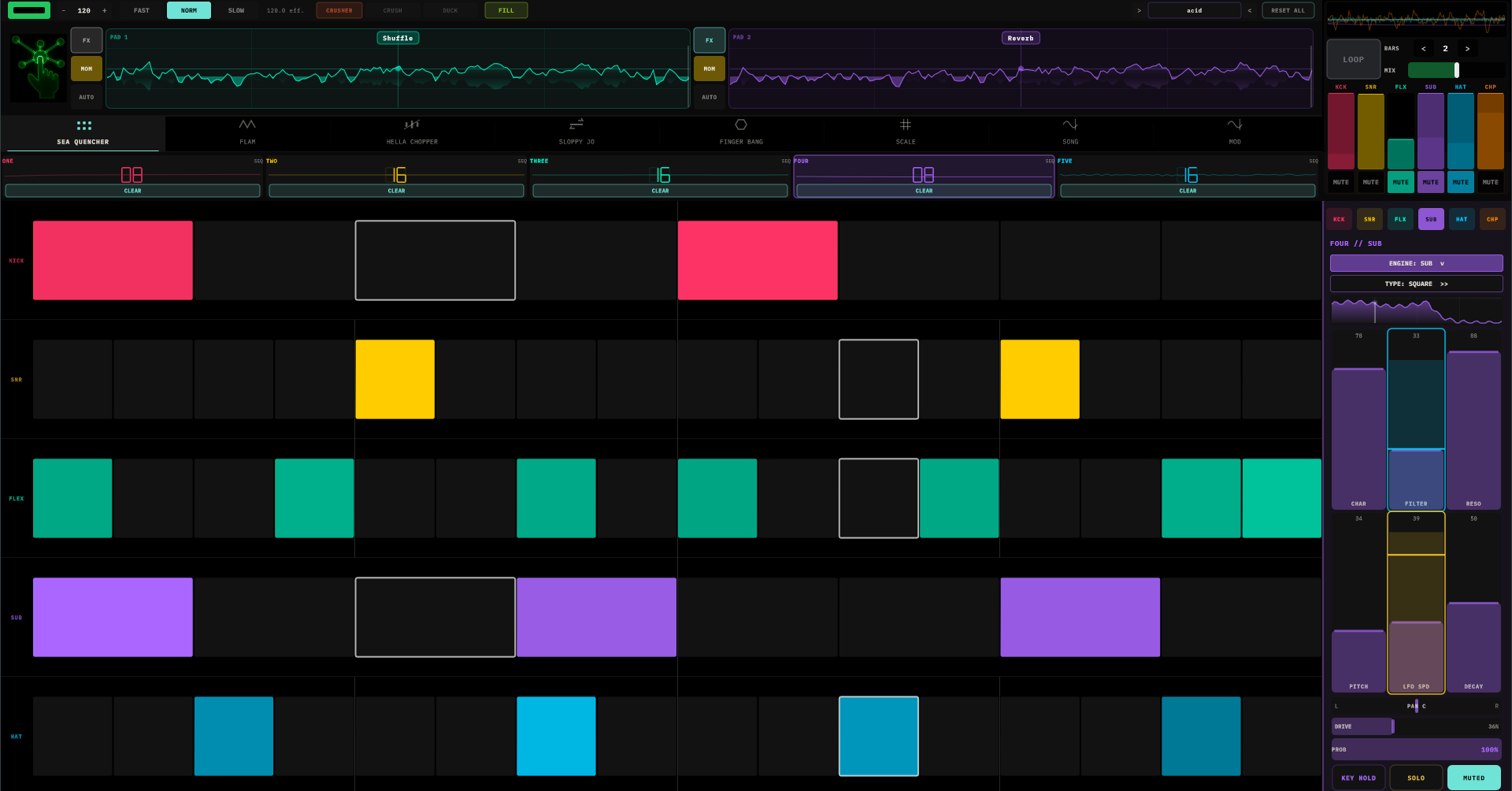
- You land on an empty grid — the machine ships hungry. Drag across a row in SEA QUENCHER to paint steps; higher on the cell is louder.
- Press play. Congratulations, you have a beat.
- Push a fader in the channel strip while it runs — every knob is live.
- Touch an XY pad up top. That's an effect. Click its name pill to swap it for one of fourteen others.
- Tap FILL. One bar of controlled vandalism, then your pattern comes back intact.
The Machine
- Transport bar — play/stop, BPM (20–300, drag or tap ±), the SLOW · NORM · FAST time multiplier (half, normal, double time), CRUSHER with its CRUSH and DUCK sliders, FILL, the trial/license pill, the preset chip with
<>steppers, and RESET ALL (two-tap — it asksCONFIRM?because it means it). - Two XY pads — always visible, always armed. Pad 1 (cyan) feeds Pad 2 (violet). Each has MOM/LATCH, an AUTO recorder, and a live scope glowing behind the crosshair.
- Eight tabs — SEA QUENCHER · FLAM · HELLA CHOPPER · SLOPPY JO · FINGER BANG · SCALE · SONG · MOD.
- Mixer (top right) — six channels of scope, fader, and mute, plus the looper.
- Channel strip (right rail) — the selected channel's engine, its six voice faders, PAN / DRIVE / PROB, and KEY HOLD / SOLO / MUTE.
- The logo opens Settings, MIDI config, licensing, and About.
The Five Channels
Five tracks — ONE through FIVE — with default voices Kick, Snare, Flex, Sub, Hat. But nothing is fixed: the ENGINE picker on the channel strip assigns any of six engines to any track. Two kicks? Sampler on everything? A snare track that's secretly a bass? All legal, all saved per preset.
Each engine brings its own six faders (the labels change with the engine; DECAY always lives lower-right):
| Engine | The six faders |
|---|---|
| Bass/Tom | CLICK · SWEEP · BODY · PITCH · TONE · DECAY — from pure boom to sharp-attack club thump |
| Snare | TONE · COLOR · BODY · PITCH · SNAP · DECAY — sine to noise, dark to sizzling |
| Flex | SHAPE · FILTER · METAL · PITCH · PUNCH · DECAY — the shapeshifter; METAL takes it from warm pluck to bell |
| Sub | CHAR · FILTER · RESO · PITCH · LFO SPD · DECAY — the bass section; its own wobble LFO built in |
| Hat | FM · COLOR · BODY · PITCH · FREQ · DECAY — tick, tsss, and everything metallic between |
| Sampler | SPD · GRN · PITCH · FILT · SCAT · DCY — granular playback of anything you load |
The Sub engine has a second picker — TYPE — with seven oscillator archetypes (SINE · SAW · SUPER · SQUARE · REESE · FM · SYNC). CHAR means something different for each one; it's always that archetype's most interesting dimension.
Below the faders: PAN (snaps to centre), DRIVE (per-channel saturation), PROB (chance a step fires — 60% on a hat channel makes every loop different for free). Bottom row: KEY HOLD (pin this channel to the first key of the progression while everything else modulates around it), SOLO, MUTE. Muted channels keep rendering silently, so envelope followers and scopes stay alive — mute a kick and it can still pump the mix.
The silhouette at the top of the strip is the voice's DNA — it reshapes live from the faders, breathes with modulation, and blooms on every trigger. When an engine is set to Sampler, the silhouette becomes the waveform — tap it to open the sample browser (folders, tap to load, triangle to audition; each channel remembers where it was browsing).
SEA QUENCHER, FLAM & SLOPPY JO
SEA QUENCHER is the main grid. Drag to paint runs of steps — vertical position inside the cell sets velocity, drawing is row-locked so you can't smear into the neighbours, drag over active steps to erase. Each channel's step count is set from its header (1–16, 32, or 64) — and counts don't have to match. A 16-step kick against a 12-step snare is one tap away, and it's the cheapest groove upgrade in the machine.
FLAM is the ratchet layer: per-step bars that turn one hit into up to four, each quieter than the last. It has its own loop length per channel, so the ratchets can orbit the pattern instead of sticking to it. The current flam step flashes when the main gate lands on it — that's your polymetric compass.
SLOPPY JO un-quantizes the machine. Four columns push beats 1–4 of every group late (drag down for lazier), and each column's drift adds a little random humanity per hit. The timing-dot scatter shows where hits actually landed. Below it, the fill sequencer — one cell per bar, up to 32 — fires FILL automatically on lit bars: light bar 4 of 4 and you've hired a drummer who always fills on the turn.
FINGER BANG
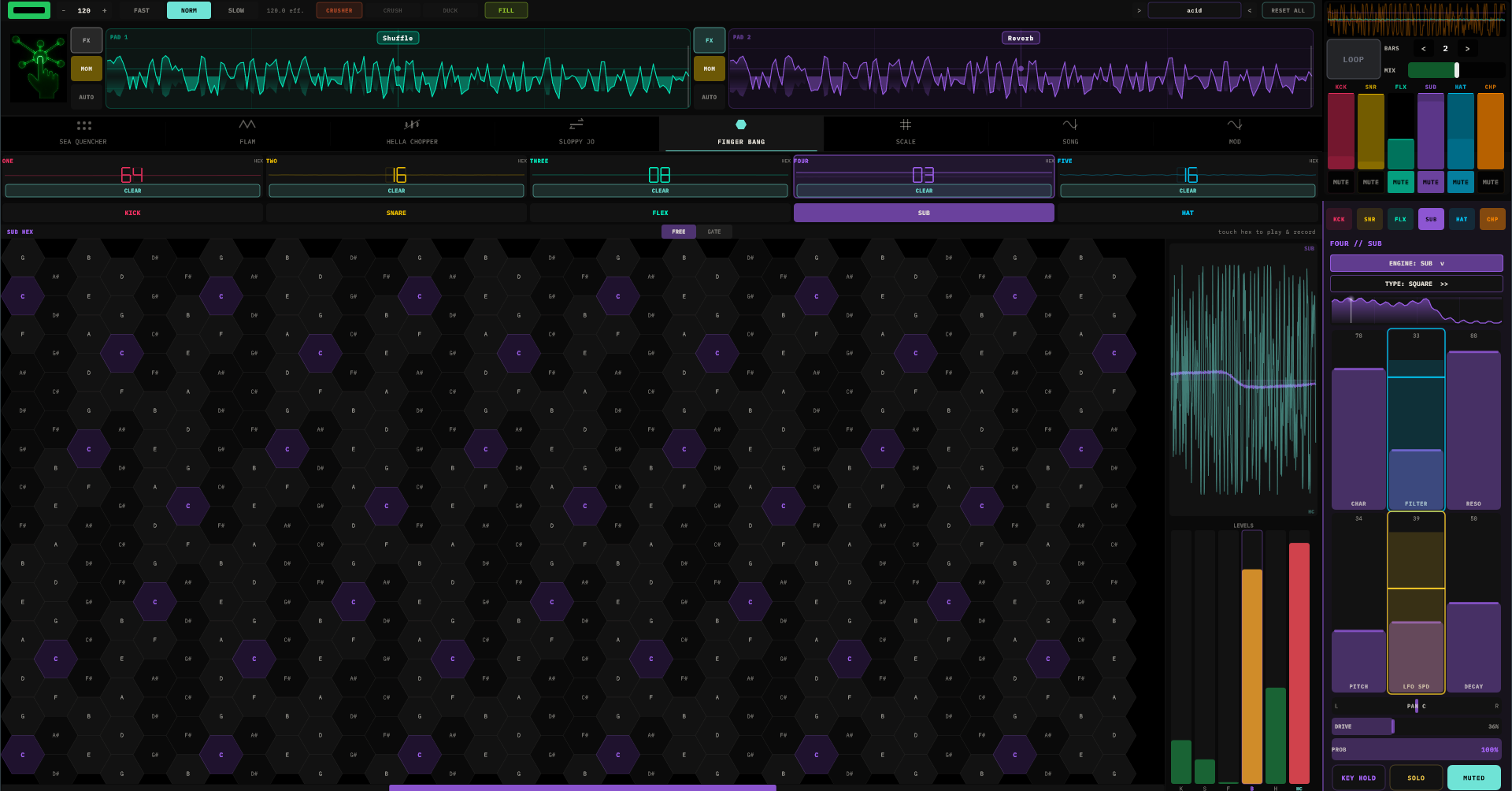
A honeycomb keyboard for melodies. Columns step a whole tone; rows step a fifth — chord shapes are the same everywhere, so your fingers learn geometry instead of key signatures. Touch a hex and the selected channel plays that pitch; while the sequencer runs, whatever you hold is recorded into the passing steps; release and the melody loops. Touch again to overwrite.
Per channel, the hex loop can run FREE (advances with the clock) or GATE (advances only when that channel actually fires — the melody rides the rhythm instead of the grid). Hex loops go up to 128 steps, and each channel's hex length is independent — pitch cycles that drift against the drums for days.
HELLA CHOPPER
The sixth track: a breakbeat slicer with two loop slots. Load a break into A (and another into B), and it's auto-sliced at the transients — MAP A / MAP B deals the slices across the steps in order, SHUFFLE deals them drunk.
Five rows per step: slice (drag the waveform to assign), probability, pitch (±12, snapped musically), reverse, and lock — locked steps are immune to chaos, shuffle, scatter, and the scale quantizer. They play exactly what you drew, which makes them the tent-pegs you improvise around.
Two global sliders: CHAOS (chance a step plays a random slice instead — from faithful to unrecognizable) and SCATTER (random pitch per trigger, snapped to musical intervals).
Touching the waveform always plays the slice — hold to retrigger at 1/16, 1/8, or 1/4; drag across slices and it follows on the grid. The LIVE / REC toggle decides whether your jam commits: REC stamps every touched slice into the passing steps (a true step-recorder feel — hold one slice for a bar and the bar is now that slice), LIVE writes nothing and just lets you solo over the top.
FILL never touches the Chopper. The break survives while the drum machine around it gets rearranged.
Scales, Keys & Other Worlds
Everything pitched — drum tuning, hex melodies, even Chopper slices — snaps to the active scale. Dial a PITCH fader anywhere; you only get notes that belong. The SCALE tab owns the key:
- A segment timeline chains up to 16 segments, each a root + scale + bar count. One segment = a static key; several = a progression the whole machine re-harmonises through, with a full-screen colour flash at every key change so you feel the modulation land.
- Tap a segment to edit — root and scale grids, bar count, and a tap-editable keyboard for custom scales (marked
*). - A circle of fifths, per-channel activity dots, and a live output monitor show what's actually sounding.
- 17 scales, Chromatic through both Diminisheds plus Arpeggio.
Other tuning worlds: the TUNING chip swaps the global intonation — eleven systems from Western 12-TET through Just Intonation, 24-tone Arabic maqam, 53-comma Turkish makam, 22-shruti, Persian dastgah, and Chinese 12-lü. The circle of fifths becomes a tuning wheel, custom scales become custom degree sets, and every voice — including the Chopper's slices — plays the true pitches. MIDI out carries them as per-channel pitch bend.
If a host pushes a global key (the TouchMachines Liveset does this), the SCALE tab goes read-only and shows FOLLOWING HOST until released. Your own progression waits underneath, unharmed.
The Chopper is quantized by interval, not absolute pitch — a drum loop has no home key, so its own natural pitch is treated as home and the scale shapes the deviations around it.
SONG
Chains your saved presets into an arrangement. The library lists every pattern; tap one to append a bar of it to the timeline, tap again to extend it (four taps = four bars). Tap a timeline step to cycle its length; hold it to remove it.
PLAY SONG pre-loads every breakbeat the song will need (a brief PREPARING flash), waits for the next bar line, and then swaps the entire machine — grids, mod wiring, key, Chopper samples — at every step boundary, seamlessly. Stuck notes are impossible; every swap flushes cleanly, including to external synths.
Patterns are referenced by name — renaming a preset updates the song, and a deleted one shows (MISSING) and is skipped rather than detonating. The song saves with your DAW project but not inside presets, so saving a pattern never drags your arrangement along with it.
MOD
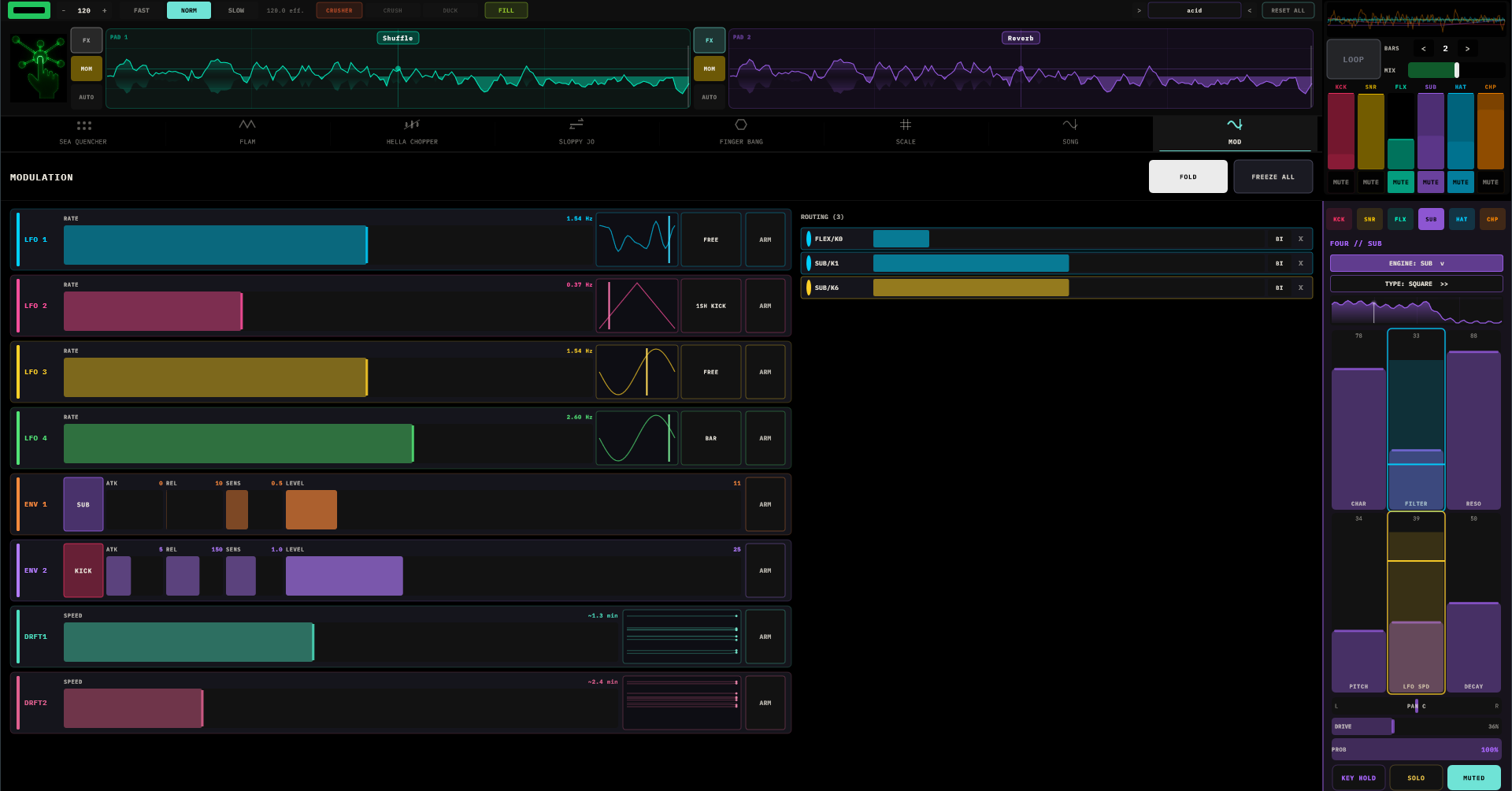
Eight modulators that can grab any fader in the machine: four LFOs, two envelope followers, and two DRIFTs.
The routing gesture: tap ARM on a modulator, then tap any fader. Done — the fader gets a halo in the modulator's colour, a routing row appears on the right (depth slider, BI/UNI polarity, remove). Drag the halo itself to set depth without leaving whatever tab you're on. Arming clears itself when you leave the tab.
- LFOs — rate slider, seven shapes (the shape button is a live waveform with a playhead), and three retrig modes: FREE (never resets), BAR (locks to the bar line), 1-SHOT (fires one cycle per hit of a chosen channel — pair with the random shapes for "new random every kick"). LFOs can modulate each other's rates: arm one, tap another's rate slider.
- ENV 1 / ENV 2 — each follows the loudness of a chosen channel, with attack, release, and sensitivity. The classic move is one tap: kick → anything, and the mix pumps. Followers keep tracking muted channels, so a silent kick can still conduct.
- DRIFT 1 / DRIFT 2 — the secret weapon. Slow, non-repeating wander, from ~15 seconds to glacial per move — and every fader you route gets its own independent curve, so one DRIFT across five faders pulls the whole pattern apart and reforms it over minutes. The scrolling wander-graph shows every lane diverging in real time. Route it, set it slow, walk away.
Header globals: FREEZE ALL (hold everything exactly where it is) and CLIP / FOLD (out-of-range modulation either pins at the rails or bounces off them — FOLD keeps the motion alive past the edges).
The XY Pads
Two pads, fifteen effects each, Pad 1 into Pad 2. Tap the name pill to swap. LATCH keeps the effect where you left it; MOM only works while touched — shape versus stab. AUTO records your XY path across a 32-step loop and replays it in sync, crosshair dancing on its own.
| Effect | X | Y | What it does |
|---|---|---|---|
| WaveFold | fold amount | symmetry | Folds the wave back into itself — clean to snarling |
| FreqShft | shift ± | feedback | Detunes everything inharmonically; feedback spirals |
| Shimmer | time | pitch ±2 oct | Pitch-shifted echoes climbing away from the source |
| CombBank | tuning | feedback | Tuned resonators — drums become chords |
| Reverb | size | brightness | Room to cavern |
| HardClip | drive | rectify | Flat-top distortion into broken-speaker territory |
| RingMod | carrier | depth | Metallic sidebands, AM radio from space |
| LoFi | bit depth | rate crunch | 16 bits down to 2 |
| Formant | vowel A–U | resonance | The drums say "aaah" |
| Chop | rate | shape | Tremolo hardening into a gate |
| Shuffle | division | chaos | Beat-synced buffer rearrangement |
| Stutter | repeat rate | pitch ramp | Touch-gated freeze-and-loop |
| TapeStop | brake time | curve | Brake, scratch (X scrubs while stopped), spin back up |
| GrnCloud | density | pitch spread | The audio dissolves into a granular swarm |
| MetalRes | tuning | resonance | Struck-metal resonators tuned to a chord |
Stutter and TapeStop are touch-gated: in MOM, hold to engage and release to let go; in LATCH, they toggle per touch.
FILL
One button. On every bar it's active, FILL picks a transform — rotate the pattern, reverse it, ghost-note it, thin it to a skeleton, double its speed, swap kick and snare, octave-jump two voices, ratchet the back half — applies it for that bar, and hands your pattern back untouched. The transform's name shows beside the button so you learn their personalities.
- Tap — one bar, releases itself cleanly on the bar line.
- Hold — continuous, a different transform each bar. Release is always bar-aligned; you cannot cut off mid-bar even if you try.
- The fill sequencer (SLOPPY JO tab) fires it automatically; the button glows lime when it's you and amber when it's the machine.
The downbeat always plays the original, the kick is mostly protected, and the Chopper is never touched — FILL vandalises responsibly.
Crusher & Looper
Both live on the master bus, and both deliberately ignore preset changes — they're performance state, and they stay where you put them while you swap patterns underneath.
CRUSHER — toggle plus two sliders. CRUSH is the crunch: saturation, glue, and a low-end lift that gets fatter the harder you push. DUCK is the pump: the kick sidechains the whole bus. Either alone, or both. When DUCK is up, the XY pads pulse red in time — the UI breathes with the mix.
LOOPER — in the mixer corner. Set BARS (1–8), tap ARM; recording starts on the next bar line and playback starts the instant the buffer fills, gapless. MIX crossfades the loop against the live machine. The classic trick: capture four good bars, swap to a completely different preset, and blend the old groove under the new one.
MIDI & Gesture Control
MIDI out (Settings → MIDI): per channel — enable, MIDI channel, octave offset, or Route All onto one channel. The emitted notes are the scale-snapped pitches the voices actually play, velocities from the steps, note-offs tied to each voice's decay. Point a channel at an external synth and it doubles the internal voice note-for-note; microtonal tunings ride along as pitch bend.
Gesture input: the XY pads listen for CC gestures on channel 1 — a wiimote or anything CC-shaped becomes a hand on the pad:
| CC | Gesture |
|---|---|
| 20 / 21 | Tilt — the pad's X / Y position |
| 22 | The finger — hold to touch the pad |
| 23 | Swap which pad you're driving |
| 30 | Toggle that pad's MOM / LATCH |
The crosshair moves on screen exactly as if you were touching it. Wave at your drum machine; it waves back.
Presets & Settings
The preset chip opens a browser with folders — tap to load, + SAVE, + FOLDER, drag to re-file, rename and delete in place. One factory preset ships: _init, an empty grid. That's deliberate — this machine's library is the one you build, and the SONG tab turns it into arrangements.
A preset captures the whole patch: every grid and layer, engines and their faders, mod routings, effects and XY automation, Chopper state, the scale timeline. Not captured, on purpose: the song (lives with your DAW project) and the Crusher/looper mix (lives with your hands).
Settings (logo): themes and per-channel colours, UI scale, MIDI config, and licensing. Intellectualist comes with a 14-day free trial — every feature, no payment details, just an email address to start it. The transport-bar pill starts it, then counts it down. Before you start it, and after it ends, the demo mutes itself for a few seconds each minute until licensed.
Recipes
1 · A groove from nothing
Paint a four-on-the-floor kick, snares on 5 and 13, a busy hat row with velocity tapered by drawing height. Now set the snare channel to 12 steps. That's it — that lurch is polymeter, and it's why the loop suddenly breathes.
2 · The self-playing patch
MOD tab: DRIFT 1, speed near glacial. Arm it and tap KICK SWEEP, SNARE TONE, SUB FILTER, HAT COLOR. Depths moderate. Now the kit slowly re-voices itself over minutes, every fader on its own path, never repeating. Leave it running while you get coffee; it will be somewhere new when you return.
3 · Kick as conductor
ENV 1 source KICK, arm, tap the Sub's FILTER. UNI polarity, healthy depth. The bass now opens with every kick — sidechain wah, no cables. Mute the kick and it still conducts, silently.
4 · Breakbeat archaeology
Load a break into Chopper A, MAP A, CHAOS to 0.4. Lock the two steps that carry the break's identity. Now SHUFFLE — everything reshuffles except your tent-pegs. REC mode, hold a slice at 1/16 through a bar for an instant roll, baked in.
5 · Build and drop
Hold FILL through the last two bars of a build — new transform every bar. Other hand: Pad 1 to HardClip, ride X up. On the downbeat: release FILL, snap the pad to neutral. The drop lands clean because release is bar-aligned — the machine won't let you fumble it.
6 · The looper pivot
Looper BARS 4, ARM at the top of a good phrase. When it's playing, load a completely different preset and ride MIX — the old groove holds the floor while the new one walks in. This is a DJ transition inside one plugin.
Field Notes
- Every fader is a performance control. The knobs feel musical across their whole travel — scrub DECAY live, it's meant for it.
- PROB is cheaper than programming variations. One fader, infinite takes.
- Channel silent? Check its MUTE, its mixer fader, and whether its grid actually has steps. The gate-flash tells you if it's firing.
- Out of key? The SCALE timeline is in charge — edit its segments. A channel ignoring the progression probably has KEY HOLD on.
- Chopper silent? No sample loaded, or nothing mapped — LOAD A, then MAP A.
- Chopper playing wrong pitches? The scale quantizer is doing its job. Lock the step to play exactly what you drew.
- FILL doing nothing? The transport isn't running. FILL only exists on bar lines.
- Crusher still on after a preset swap? By design — it's global. Turn it down; it won't fight you.
- Looper out of sync? ARM slightly before the downbeat — recording waits for the bar line.
- Modulation not moving? Arm first, then tap the fader. Then check the depth — a zero-depth routing is philosophy, not modulation.
- CPU hot? Resonant effects stacked in series and dense granular clouds are the usual suspects. Simplify one pad first.